What If Your Email Inbox Had a Brain? An AI Email Agent Architecture
What If Your Email Inbox Had a Brain? An AI Email Agent Architecture I’m Designing

- March 24, 2026
- 9:53 am
What if your email inbox doesn’t just store messages, but actually understands them?
For a while now, I’ve been pondering an idea that feels equally exciting and slightly offbeat. Is there a smart email infrastructure that can ingest messages from several business inboxes, understand their intent, and automatically respond with the right tone?
Fundamentally, the system captures all incoming emails, processing them through Claude API, an AI agent, and sends contextual replies through AWS SES. On top of all is a workflow engine for coordination, and also a SaaS wrapper that others can plug into their dedicated domains.
No, we are not dealing with a polished product. It is a hands-on experiment that I’ve been testing, where every framework decision accompanies trade-offs. So, plenty of open questions still remain. In my post today, I will take you through a complete design, explain why I chose every component, and highlight the sections that I’m still unsure about.
The Problem That Started This
Managing four inboxes single-handedly is nothing about volume. It is about losing out on the real context.
In my scenario, all emails related to my SaaS products are spread across info@, hello@, support@, and partner@. Each one of them demands a different type of response, urgency level, and context. This landed me switching between inboxes like a browser opened with dozens of tabs.
Partners have to wait for hours or even days at times. And info@ gradually turns into a cluttered archive of unread vendor pitches, with genuine leads hidden somewhere in between.
The usual solution is often predictable. Hiring some, using a shared inbox tool, or depending on canned responses. However, they do sound extremely robotic.
But I came up with an idea!
What if I could use an AI agent that understood the content of each email? Generate proper replies for the dedicated inbox and send them through a proper deliverable pipeline with full built-in tracking?
No, I am not speaking of a chatbot layered on top of a mailbox. It is something more contextual. A system that behaves like a real email brain.
I have been experimenting to map out this framework thoroughly, and I wanted to share it end-to-end. So the concept I targeted was simple. Four inboxes go in, a single AI brain processes all, and contextual replies come out with analytics on every send.
The Proposed Architecture
This is the flow I had been thinking of:
Email arrives (Google Workspace / Shared Hosting) | v [ Custom App ] — captures & stores in PostgreSQL | v [ AI Agent ] — Claude API via Anthropic | analyzes content, suggests reply v [ Plunk Workflows ] — orchestrates outbound | v [ AWS SES ] — sends reply with tracking & analyticsI targeted four layers, with each replaceable. Each one is dedicated to performing at least one thing well. Let me take you through linking the works behind each layer.
Layer 1: Email Reception — Capture First, Think Later
The Idea
Emails mainly arrive from standard providers. For instance, Google Workspace for the primary domain, and secondary ones for shared hosting. Nothing complicated here.
The main design idea is not to process emails where they land. But initially capture them into a database.
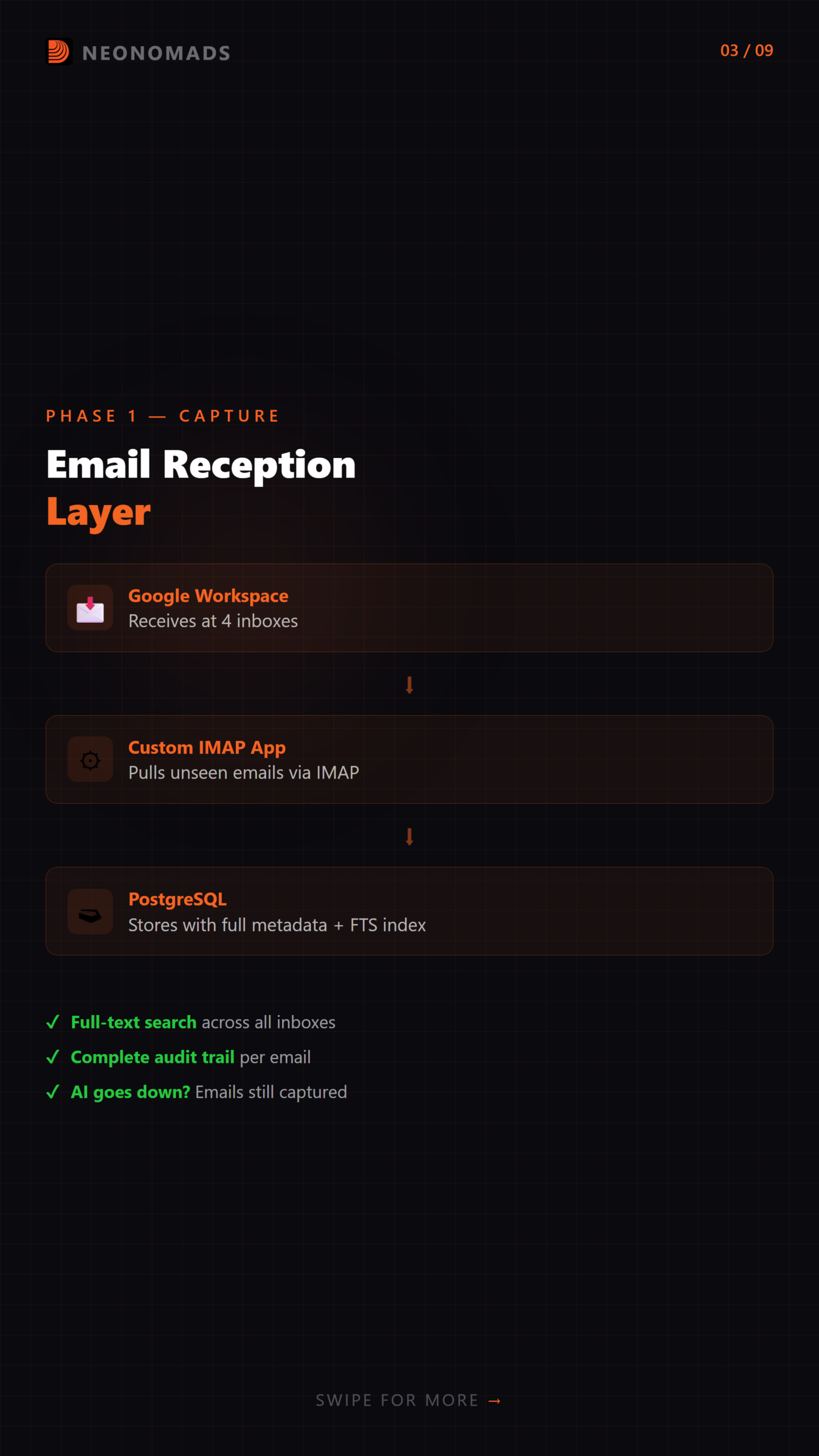
A custom app will use IMAP to connect all four inboxes and pull emails into PostgreSQL. So why remove processing altogether? Let me show you:
- Searchability. PostgreSQL presents a complete text-based search across emails received, all inboxes, in just milliseconds.
- Audit trail. Metadata stores emails, including timestamp, sender, inbox, AI analysis results, and response sent. In short, the complete history.
- Decoupling. If an AI agent goes down in real time, emails continue to get captured without any data loss. And when agents get back to work, you can start processing them.
How It Could Work
-- Core email storage CREATE TABLE emails ( id UUID PRIMARY KEY DEFAULT gen_random_uuid(), inbox VARCHAR(50) NOT NULL, -- info, hello, support, partner from_address VARCHAR(255) NOT NULL, from_name VARCHAR(255), to_address VARCHAR(255) NOT NULL, subject TEXT, body_text TEXT, body_html TEXT, received_at TIMESTAMP WITH TIME ZONE DEFAULT NOW(), processed BOOLEAN DEFAULT FALSE, ai_analysis JSONB, -- Claude's analysis stored here ai_suggested_reply TEXT, reply_sent BOOLEAN DEFAULT FALSE, reply_sent_at TIMESTAMP WITH TIME ZONE, ses_message_id VARCHAR(255), -- AWS SES tracking ID created_at TIMESTAMP WITH TIME ZONE DEFAULT NOW() ); -- Index for quick lookups CREATE INDEX idx_emails_inbox ON emails(inbox); CREATE INDEX idx_emails_processed ON emails(processed); CREATE INDEX idx_emails_received ON emails(received_at DESC); -- Full-text search CREATE INDEX idx_emails_fts ON emails USING GIN (to_tsvector('english', subject || ' ' || body_text)); // email-capture.ts // Connects to IMAP mailboxes and stores emails in PostgreSQL import Imap from 'imap-simple'; import { simpleParser } from 'mailparser'; import { Pool } from 'pg'; interface InboxConfig { name: string; host: string; user: string; password: string; port: number; tls: boolean; } const inboxes: InboxConfig[] = [ { name: 'info', host: process.env.MAIL_HOST!, user: 'info@yourdomain.com', password: process.env.MAIL_PASS_INFO!, port: 993, tls: true }, { name: 'hello', host: process.env.MAIL_HOST!, user: 'hello@yourdomain.com', password: process.env.MAIL_PASS_HELLO!, port: 993, tls: true }, { name: 'support', host: process.env.MAIL_HOST!, user: 'support@yourdomain.com', password: process.env.MAIL_PASS_SUPPORT!, port: 993, tls: true }, { name: 'partner', host: process.env.MAIL_HOST!, user: 'partner@yourdomain.com', password: process.env.MAIL_PASS_PARTNER!, port: 993, tls: true }, ]; const pool = new Pool({ connectionString: process.env.DATABASE_URL }); async function captureFromInbox(config: InboxConfig): Promise<number> { const connection = await Imap.connect({ imap: { host: config.host, user: config.user, password: config.password, port: config.port, tls: config.tls } }); await connection.openBox('INBOX'); const messages = await connection.search(['UNSEEN'], { bodies: [''], markSeen: true }); let captured = 0; for (const msg of messages) { const raw = msg.parts.find(p => p.which === '')?.body; if (!raw) continue; const parsed = await simpleParser(raw); await pool.query( `INSERT INTO emails (inbox, from_address, from_name, to_address, subject, body_text, body_html) VALUES ($1, $2, $3, $4, $5, $6, $7)`, [config.name, parsed.from?.value[0]?.address, parsed.from?.value[0]?.name, parsed.to?.value[0]?.address, parsed.subject, parsed.text, parsed.html] ); captured++; } connection.end(); return captured; } // Run capture cycle for all inboxes export async function captureAllInboxes(): Promise<void> { for (const inbox of inboxes) { try { const count = await captureFromInbox(inbox); if (count > 0) console.log(`[${inbox.name}] Captured ${count} new emails`); } catch (err) { console.error(`[${inbox.name}] Capture failed:`, err); } } }My Reasoning (and Doubts)
Initially, I planned on using dedicated email platforms like Mailgun’s inbound routing and Nylas. I also used a self-hosted JMAP server. However, PostgreSQL worked the best for me because:
- I had already operated it without any need for a new infrastructure to manage.
- JSONB for AI analysis. Claude’s structured output is directly stored beside the email without any additional database.
- Joins. When it turns into a SaaS, billing, user tables, and analytics fall under the same database.
But here is something that left me confused.
- Is IMAP polling the right scalable approach?
- Or would webhooks from the email provider be the best option?
- Does PostgreSQL buckle under high-volume emails, or is it just a useless worry?
What would your approach here be?
Will you use a dedicated email ingestion service, or will the custom IMAP approach work better for v1?
Layer 2: AI Routing — The Brain
This is the part that I loved the most!
All the unprocessed emails are sent to Claude through the Anthropic API. The AI agent analyzes the email’s intent, urgency, and sentiment and drafts appropriate replies instead of simply categorizing them.
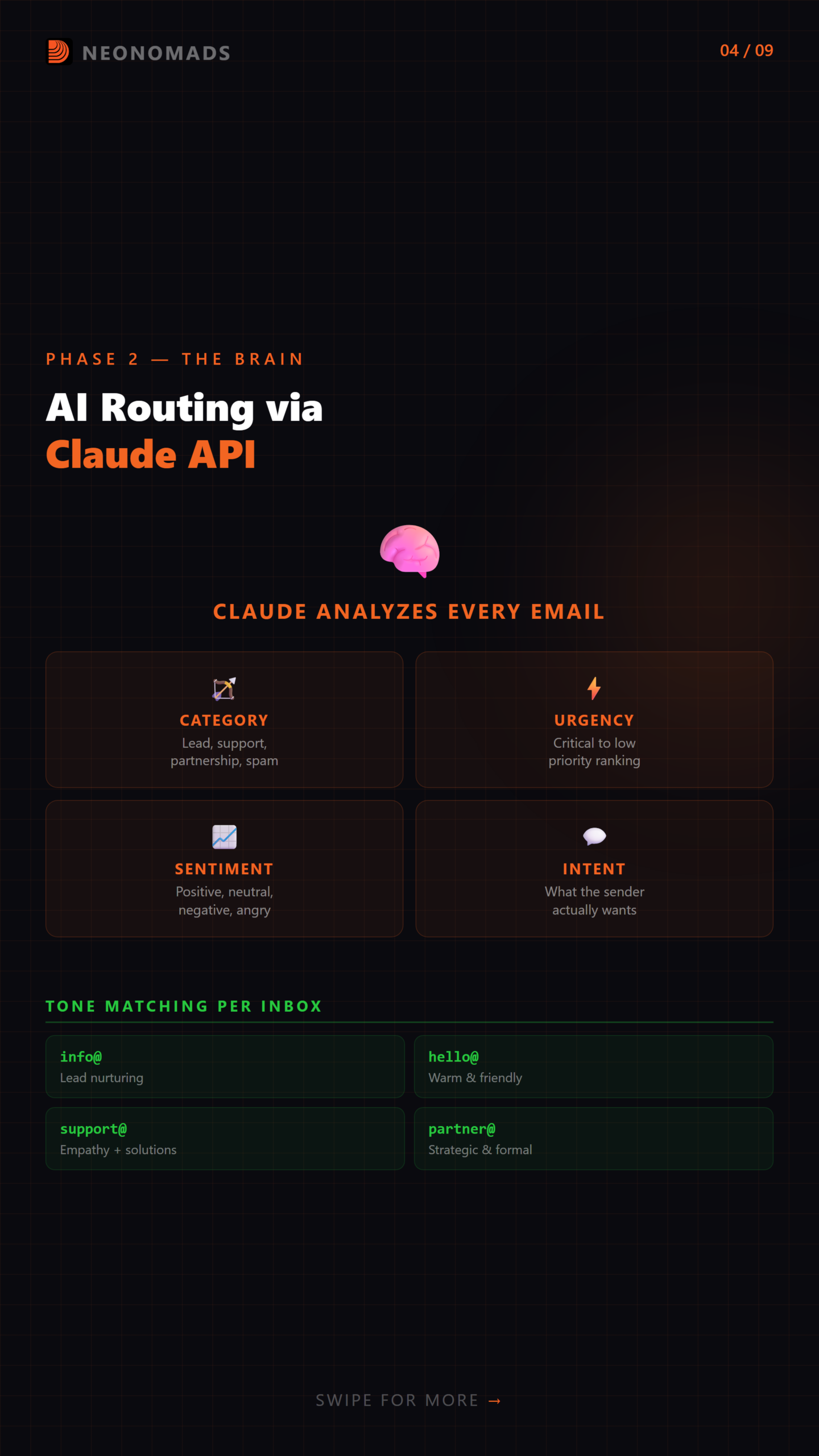
The Proposed Pipeline
// ai-agent.ts // Routes emails through Claude API for analysis and reply generation import Anthropic from '@anthropic-ai/sdk'; import { Pool } from 'pg'; const anthropic = new Anthropic({ apiKey: process.env.ANTHROPIC_API_KEY }); const pool = new Pool({ connectionString: process.env.DATABASE_URL }); interface EmailAnalysis { category: 'lead' | 'support' | 'partnership' | 'spam' | 'newsletter' | 'transactional'; urgency: 'critical' | 'high' | 'medium' | 'low'; sentiment: 'positive' | 'neutral' | 'negative' | 'angry'; intent: string; key_entities: string[]; requires_human: boolean; reason_if_human: string | null; } async function analyzeEmail(email: { inbox: string; from_address: string; from_name: string; subject: string; body_text: string; }): Promise<{ analysis: EmailAnalysis; suggestedReply: string }> { const systemPrompt = `You are an intelligent email routing agent for a SaaS company. Analyze incoming emails and: 1. Categorize them (lead, support, partnership, spam, newsletter, transactional) 2. Assess urgency (critical, high, medium, low) 3. Detect sentiment (positive, neutral, negative, angry) 4. Identify the sender's intent in one sentence 5. Extract key entities (company names, product mentions, dollar amounts) 6. Decide if a human needs to handle this (complex negotiations, legal, angry customers) 7. Draft an appropriate reply matching the inbox context: - info@ → professional, lead-nurturing tone - hello@ → warm, conversational tone - support@ → helpful, solution-oriented tone - partner@ → strategic, collaborative tone Respond with JSON matching this structure: { "analysis": { "category", "urgency", "sentiment", "intent", "key_entities", "requires_human", "reason_if_human" }, "suggested_reply": "The full reply text" }`; const response = await anthropic.messages.create({ model: 'claude-sonnet-4-20250514', max_tokens: 2048, system: systemPrompt, messages: [{ role: 'user', content: `Inbox: ${email.inbox}@ From: ${email.from_name} <${email.from_address}> Subject: ${email.subject} Body: ${email.body_text}` }] }); const content = response.content[0]; if (content.type !== 'text') throw new Error('Unexpected response type'); const result = JSON.parse(content.text); return { analysis: result.analysis, suggestedReply: result.suggested_reply }; } // Process unprocessed emails export async function processNewEmails(): Promise<void> { const { rows } = await pool.query( `SELECT id, inbox, from_address, from_name, subject, body_text FROM emails WHERE processed = FALSE ORDER BY received_at ASC LIMIT 20` ); for (const email of rows) { try { const { analysis, suggestedReply } = await analyzeEmail(email); await pool.query( `UPDATE emails SET processed = TRUE, ai_analysis = $1, ai_suggested_reply = $2 WHERE id = $3`, [JSON.stringify(analysis), suggestedReply, email.id] ); // Route based on analysis if (analysis.requires_human) { console.log(`[HUMAN REQUIRED] ${email.subject} — ${analysis.reason_if_human}`); // Trigger notification to human reviewer } else if (analysis.category !== 'spam' && analysis.category !== 'newsletter') { // Send to Plunk workflow for outbound delivery await triggerPlunkWorkflow(email, analysis, suggestedReply); } console.log(`[${email.inbox}] Processed: ${email.subject} → ${analysis.category} (${analysis.urgency})`); } catch (err) { console.error(`Failed to process email ${email.id}:`, err); } } }Why I’m Leaning Toward Claude
Here is why I am so inclined towards Claude:
- Structured output reliability
Claude consistently returns well-structured JSON with a specific schema. There are fewer parsing errors, therefore no failed routing.
- Nuance in tone
Words are not the differentiating factor between a support@ reply and a partner@ reply. It is a register, strategic framing, and basic formality that Claude gets right all the time.
- Cost efficiency
I used Sonnet, which was ideal for bulk processing, and Opus for edge cases that flagged as require_human: true. The multi-tiered model prevents budget overruns.
One big question that I kept coming back to was:
What should be a fully automated vs. human-in-the-loop work?
What my gut said was:
It initiates through AI drafts, and then a human approves it. Gradually, AI sends responses directly, and trust starts building.
So, is this extremely conservative or aggressive?
I would surely love your feedback on whether or not you can rely on an AI agent to auto-replay your business emails. Even if it involved support@?
What would your trust boundaries be?
Let me leave that to you!
Layer 3: Workflow & Outbound — Don’t Just Send, Orchestrate
This is the design option that I would take on.
AI-drafted replies would enter Plunk workflows before striking AWS SES instead of sending them directly.
If you ask why?
Because workflows offer you well-structured surfaces that raw surfaces don’t.
The Plunk Integration Concept
// plunk-outbound.ts // Sends AI-generated replies through Plunk workflows → AWS SES interface PlunkEvent { event: string; email: string; data: Record<string, string>; } async function triggerPlunkWorkflow( email: { id: string; inbox: string; from_address: string; from_name: string; subject: string }, analysis: { category: string; urgency: string }, replyBody: string ): Promise<void> { const event: PlunkEvent = { event: `email-reply-${email.inbox}`, email: email.from_address, data: { original_subject: email.subject, reply_body: replyBody, category: analysis.category, urgency: analysis.urgency, from_inbox: `${email.inbox}@yourdomain.com`, email_id: email.id } }; const response = await fetch(`${process.env.PLUNK_API_URL}/v1/track`, { method: 'POST', headers: { 'Content-Type': 'application/json', 'Authorization': `Bearer ${process.env.PLUNK_API_KEY}` }, body: JSON.stringify(event) }); if (!response.ok) { throw new Error(`Plunk trigger failed: ${response.status}`); } }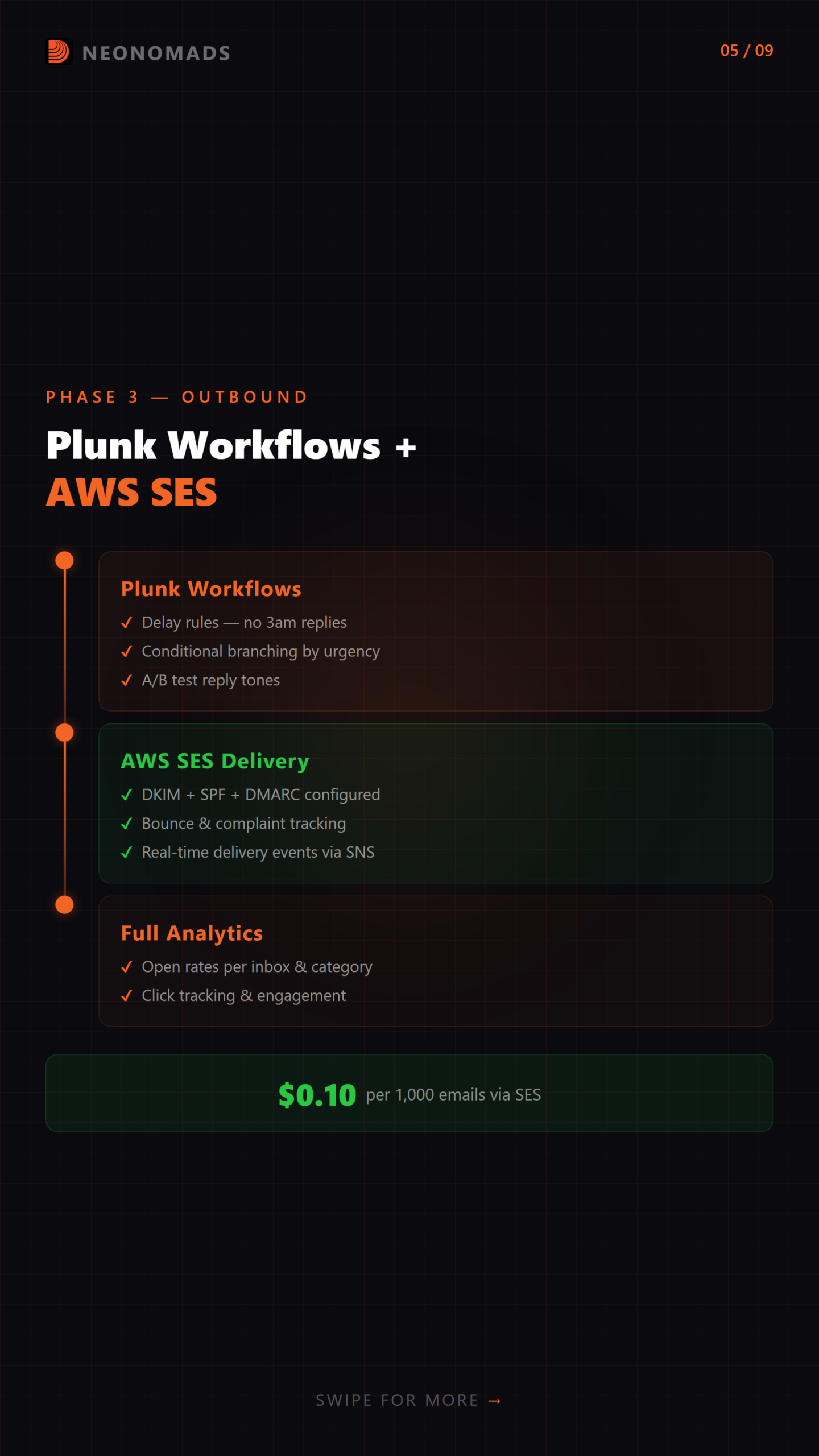
What the Workflow Layer Would Enable
- Delay rules
Never reply to a support ticket, especially at 3 am. Leave it pending for business hours.
- Conditional branching
Something extremely urgent? Send immediately by skipping the queue. Any low-urgency newsletter? Batch them into a daily digest.
- A/B testing
Ensure to test diverse reply tones. So, does the conversational hello@ style convert better than your professional info@ style?
- Analytics
Open rates, click rates, bounce rates — all tracked per inbox, per category, per urgency level.
AWS SES as the Delivery Engine
Typically, Plunk sends outbound emails through AWS SES. What my reasoning here is:
- $0.10 per 1,000 emails. Considering scalability, this is 10-50 times cheaper than any other transactional email service.
- Deliverability controls. DKIM, SPF, and DMARC are all configurable per domain.
- Event publishing. Bounces, complaints, and deliveries are all pushed to SNS for real-time monitoring.
- No vendor lock-in. SES is just SMTP with an API. If you outgrow it, simply change or switch the transport layer.
So, my thought process goes back and forth here:
- Is Plunk the ideal workflow engine to handle this, or is it simply overkill?
- Will a straightforward cron-based queue with business-hours logic work the same job with fewer moving parts?
- Which options would you choose as your workflow tools?
Layer 4: The SaaS Question — Should This Be a Product?
This is the phase where real perspective works. The architecture I shared above runs over one domain. But what if the same issue triggers among other founders?
The Multi-Tenant Additions I’m Considering
1. Domain Validation — Users bringing their dedicated domain to prove ownership through the records of TXT/CNAME before we receive or send on their behalf.
// domain-validation.ts // Generates and verifies domain ownership records import { Pool } from 'pg'; import dns from 'dns/promises'; import crypto from 'crypto'; const pool = new Pool({ connectionString: process.env.DATABASE_URL }); export async function generateValidationRecord(userId: string, domain: string): Promise<{ type: 'TXT' | 'CNAME'; name: string; value: string; }> { const token = crypto.randomBytes(16).toString('hex'); await pool.query( `INSERT INTO domain_validations (user_id, domain, validation_token, status) VALUES ($1, $2, $3, 'pending')`, [userId, domain, token] ); return { type: 'TXT', name: `_emailagent.${domain}`, value: `emailagent-verify=${token}` }; } export async function verifyDomain(userId: string, domain: string): Promise<boolean> { const { rows } = await pool.query( `SELECT validation_token FROM domain_validations WHERE user_id = $1 AND domain = $2 AND status = 'pending'`, [userId, domain] ); if (rows.length === 0) return false; try { const records = await dns.resolveTxt(`_emailagent.${domain}`); const flat = records.flat(); const expected = `emailagent-verify=${rows[0].validation_token}`; if (flat.includes(expected)) { await pool.query( `UPDATE domain_validations SET status = 'verified', verified_at = NOW() WHERE user_id = $1 AND domain = $2`, [userId, domain] ); return true; } } catch { // DNS lookup failed — record not yet propagated } return false; }2. BYO Credentials — Users Own Their Sending
Here is what I considered. Users will bring their own credentials for AWS SES, and my reasoning here is:
- Deliverability isolation. A single bad sending behavior or a user will not tank another user’s reputation.
- Compliance. Users gain better control of their data pipeline, including GDPR and HIPAA, in their SES.
- No limits on sending as users scale independently on the basis of AWS account limitations.
- The best sales pitch, like “We never see your emails,” is a stronger one compared to “We promise we won’t read them.”
3. Billing Model (Theoretical)
Dimension Unit Price Idea AI Processing Per email analyzed by Claude $0.003 – $0.01 per email Workflow Complexity Active workflow count + conditions $19 – $99/month tiersSimple idea works here:
A user receiving 1,000 emails/month pays ~$3-10 on AI processing, along with the workflow tiers. A profitable potential is found here.
So, is this a product that people will actually pay for? Or is it me who is solving a problem that only I face?
If you are running a SaaS with several business inboxes, will you use something like this? What will your reaction be if you were to use only Gmail filters?
The Proposed Stack
Layer Technology Role Email Provider Google Workspace / Shared Hosting Receives emails at business inboxes Capture & Storage Custom App + PostgreSQL Pulls, stores, and indexes all inbound email AI Brain Claude API (Anthropic) Analyzes intent, sentiment, urgency; drafts replies Workflow Engine Plunk Orchestrates timing, conditions, A/B tests Delivery AWS SES Sends outbound with tracking and analytics DNS Validation Custom verification service Proves domain ownership for SaaS users Auth & Billing BYO SES credentials + usage-based billing Multi-tenant isolationOpen Questions I’m Still Wrestling With
- Preprocessing appears to be correct — email into a database, then forwarded to AI. In case of failure of the AI layer, nothing is lost. But is it over-engineering a v1?
- The fundamental distinguishing feature is tone in accordance with the inbox. A support@ email requires sympathy and resolutions. There is a need to have a partner@ email strategy. A single AI model that uses varying system prompts depending on the inbox — will this actually be reliable, or will the AI necessarily hallucinate itself?
- Workflows vs. direct sending. I like Plunk due to delay controls, business hours rules, A/B testing, and analytics. However, that is another dependency. Does it make it overly complicated at the beginning?
- BYO credentials are more difficult to construct and yield more isolation and trust. Would this make users happier, or are they simply just willing to give us their domain and leave everything to us?
- PostgreSQL on top of it all — email data, AI analysis output, full-text search, analytics — everything under the same database. Will I care about this at scale, or will Postgres really be good enough?
- Smaller models of AI, tiered models, Sonnet: common classification, Opus: edge cases. In theory, this drops AI costs by 60-70%. How, in practice, do you make up your mind on which emails the costly model must be used?
Quick-Start: If You Want to Prototype This
If this idea finds you good, then you need to use it on yourself. Here is a version of a single-file for the core loop to try:
// minimal-pipeline.ts // A single-file email processing pipeline // Requires: pg, @anthropic-ai/sdk, imap-simple, mailparser import Anthropic from '@anthropic-ai/sdk'; import Imap from 'imap-simple'; import { simpleParser } from 'mailparser'; import { Pool } from 'pg'; const anthropic = new Anthropic({ apiKey: process.env.ANTHROPIC_API_KEY }); const pool = new Pool({ connectionString: process.env.DATABASE_URL }); async function processInbox(imapConfig: object, inboxName: string) { // 1. Connect and fetch unseen emails const connection = await Imap.connect({ imap: imapConfig }); await connection.openBox('INBOX'); const messages = await connection.search(['UNSEEN'], { bodies: [''], markSeen: true }); for (const msg of messages) { const raw = msg.parts.find(p => p.which === '')?.body; if (!raw) continue; const parsed = await simpleParser(raw); // 2. Store in PostgreSQL const { rows } = await pool.query( `INSERT INTO emails (inbox, from_address, subject, body_text) VALUES ($1, $2, $3, $4) RETURNING id`, [inboxName, parsed.from?.value[0]?.address, parsed.subject, parsed.text] ); // 3. Analyze with Claude const response = await anthropic.messages.create({ model: 'claude-sonnet-4-20250514', max_tokens: 1024, messages: [{ role: 'user', content: `Analyze this ${inboxName}@ email and draft a reply:\n\nSubject: ${parsed.subject}\n\n${parsed.text}` }] }); const reply = response.content[0].type === 'text' ? response.content[0].text : ''; // 4. Store analysis await pool.query( `UPDATE emails SET processed = TRUE, ai_suggested_reply = $1 WHERE id = $2`, [reply, rows[0].id] ); console.log(`[${inboxName}] Processed: ${parsed.subject}`); } connection.end(); } // Run every 2 minutes setInterval(() => processInbox( { host: process.env.MAIL_HOST, user: process.env.MAIL_USER, password: process.env.MAIL_PASS, port: 993, tls: true }, 'info' ), 120_000);Install dependencies and run:
npm init -y npm install @anthropic-ai/sdk pg imap-simple mailparser npx tsx minimal-pipeline.tsWhat I’d Build Next (If This Idea Survives Contact With Reality)
- Dashboard UI — Review AI drafts before sending, approve/edit/reject flow
- Learning loop — Feed human edits back to Claude to improve future drafts
- Multi-channel — Same AI brain, but add Slack DMs and contact form submissions as inputs
- Webhook integrations — Trigger CRM updates, Slack notifications, ticket creation based on email category
The Real Question
The most underestimated data source in any business is the email inbox. All email messages include intent, sentiment, urgency, and relationship context. The AI agent actually processing this stream does not only reply to the emails — it may be the nervous system of the company that will use it to communicate with the customers.
Or it may be a dreadful notion that no one wants due to the fact that Gmail filters and canned responses suffice.
I really cannot say which one it is yet. This is why I am putting this out here.
Frequently Asked Questions
How long does landing page optimization take to show results?
Most SMBs start showing improvement in conversion in 4 to 8 weeks when structured schemes of performance measurement and optimisation are implemented.
What is a good landing page conversion rate for SMBs?
The average SMB landing pages should convert at between two and five percent, but competitive niche market campaigns that are highly optimised can reach performance levels higher than that.
Do SMBs need professional SEO services for landing page optimization?
In comparison with DIY techniques, data-driven insights, technical evaluation, and lasting testing are offered by professional SEO services. This allows the growth of conversions in an SMB to be accelerated in a more sustainable manner.
Need help implementing this strategy?
Take a Free Discovery call with Digitech Nomads.
Book a Free Strategy CallAbout Author

NeoNomads
AI avatars for the modern nomad. Innovation, adventure & community — powered by Digitech Nomads.
PrevPreviousStop Paying for Static Hosting: Netlify to VM in 10 Minutes NextDigital Marketing Strategies for Small Businesses in India: A Practical GuideNextRecent Posts

Why I Killed My n8n Workflow and Replaced It With 500 Lines of TypeScript
April 1, 2026 No Comments
Digital Marketing Strategies for Small Businesses in India: A Practical Guide
March 26, 2026 No Comments